Crop an image online, free
Crop an image online for free: drag a frame over your photo, lock a ratio like 1:1 or 16:9, download the PNG at full resolution. Nothing is uploaded.
No picture yet.
The frame edges are the crop. Drag inside to move it, drag a corner to resize.
Pictures are processed inside this browser tab. Nothing is uploaded to a server.
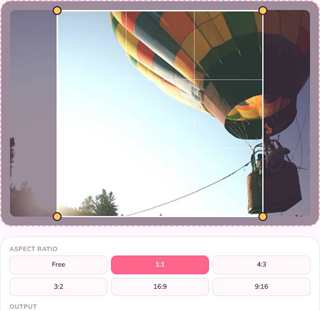
Cropping is the smallest edit with the biggest effect: the white space goes, the subject stays, and a picture suddenly reads clearly in a chat window or a thumbnail.
This page crops a picture in your browser. Drag a frame, optionally lock a ratio, download the PNG. No upload, no account, no watermark.
How to crop an image here
- Add a picture — drop it on the frame area, paste it with Ctrl + V, or press Choose a picture.
- Move the frame by dragging inside it, or drag a corner to resize it. The area outside the frame is dimmed, so what you keep is obvious.
- Optionally lock a ratio. Free lets the frame take any shape. 1:1, 4:3, 3:2, 16:9 and 9:16 keep the frame locked while you drag.
- Watch the output size. It updates live and is shown in the source picture's own pixels, not the on-screen size.
- Download the cropped PNG, or copy it to your clipboard.
Picking the right ratio
| Ratio | Where it fits |
|---|---|
| 1:1 | Profile pictures, product tiles, marketplace listings |
| 4:3 | Screenshots of apps and presentations |
| 3:2 | Camera photos printed or shared as they were shot |
| 16:9 | Video frames, slide backgrounds, hero images |
| 9:16 | Stories, phone wallpapers, vertical video covers |
When nothing has to match a template, leave the ratio on Free. A frame that follows the subject usually looks better than a frame that follows a rule.
Why the crop keeps its quality
The frame is not a preview of a rescaled image: it is a window over the original pixels. Cropping reads the exact pixel rectangle you selected from the source picture and writes it to a new PNG, so a 6000-pixel photo cropped to a quarter still has those 1500 pixels of real detail.
The only quality decision left is what you do afterwards. If the cropped picture still needs to be smaller for a website, resize it — that step re-samples, and that is where detail is genuinely traded for size.
When you want more than a crop
- Straightening a crooked scan. This tool does not rotate the frame; rotate the picture first on the canvas, then crop.
- Cutting a shape, not a rectangle. Circles and cut-outs need a mask, not a crop.
- Removing the background. That is a different kind of edit and this tool does not pretend to do it.
Practical notes
- The frame always stays inside the picture, so a crop can never include empty borders.
- Choosing a ratio after moving the frame keeps the frame centred where you left it.
- Cropping is not destructive to the original file on your device: you get a new PNG, the source is untouched.
- Everything happens in the tab. Close it and there is nothing left anywhere, on our side or yours.
This page is one of Pixmora's free image tools — the single-job version of the canvas that also arranges, merges and copies pictures.
Cropping: quick answers
How do I crop a picture without losing quality?
Drag the frame over the part you want to keep, then press Download cropped PNG. The output is written at the picture's original resolution, not at the on-screen size.
Can I crop to a fixed aspect ratio?
Pick a ratio from the list — 1:1, 4:3, 3:2, 16:9 or 9:16. The frame then keeps that shape while you drag its corners, which is the fast way to hit a template.
Is my picture uploaded when I crop it?
No. Cropping runs inside your browser tab using the Canvas API, so the picture is never sent to a server and nothing is stored anywhere.
Can I copy the cropped image instead of saving it?
Press Copy instead of Download and the cropped PNG is written to your clipboard, ready to paste into a document, a chat or a form.
What if the cropped image is still too large?
Crop it here, then open the result in the resize tool. Shrinking keeps a picture sharp; only enlarging adds softness.